
Printer DPI Explained: DPI vs PPI and What Resolution You Need
Last Updated:Quick answer: DPI (dots per inch) is how many tiny dots of ink a printer can place in an inch of paper. PPI (pixels per inch) is how much detail is in your image file. For sharp results, set up photos and designs at 300 PPI at the size you'll print. Leave the printer on its normal or high quality setting, which already prints at 600 to 4800 DPI or more. Beyond about 1200 DPI, the paper and the ink matter far more than a higher number on the spec sheet.
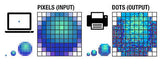
Resolution is one of the most misunderstood numbers in printing. Printer boxes advertise "4800 x 1200 optimized dpi," camera apps talk about megapixels, and design tools ask for PPI, so it's no surprise people mix them up. This guide sorts out what each term means, what resolution you actually need for text, photos and posters, and how to fix prints that come out blurry or pixelated.
What Is DPI in Printing?
DPI measures the printer's output: how many individual dots of ink (or toner) it can place side by side in one inch. Inkjets build every color out of tiny dots of cyan, magenta, yellow and black, so more dots per inch means smoother gradients and finer detail, up to a point.
You'll often see two numbers, like 4800 x 1200 DPI. The first is the horizontal resolution, set by how precisely the printhead fires as it moves across the page. The second is the vertical resolution, set by how finely the paper advances. "Optimized" or "enhanced" DPI means the printer layers dots from several passes, so it isn't a true physical grid.
What Is PPI, and How Is It Different from DPI?
PPI (pixels per inch) describes your image file: how many pixels will be packed into each inch when you print it at a given size. The same photo has a different PPI depending on how big you print it:
| Image size (pixels) | Printed at | Effective PPI | Result |
|---|---|---|---|
| 3000 x 2000 | 10 x 6.7 in | 300 | Sharp photo quality |
| 3000 x 2000 | 20 x 13.3 in | 150 | Good from a few feet away |
| 1200 x 800 | 8 x 5.3 in | 150 | OK for casual prints |
| 1200 x 800 | 16 x 10.7 in | 75 | Visibly soft or blocky |
The printer takes each pixel and renders it with many ink dots. That's why a printer's DPI is always much higher than the image's PPI. The two numbers measure different things and shouldn't be expected to match.
What Resolution Do You Actually Need?
| What you're printing | Image resolution (PPI at print size) | Printer quality setting |
|---|---|---|
| Everyday text documents | n/a (text is vector) | Normal, or Draft for rough copies |
| Photos on photo paper | 300 PPI | Best / High, correct photo paper selected |
| Flyers and invitations | 300 PPI | High |
| Posters viewed from a few feet | 150 PPI | Normal or High |
| Banners viewed from across a room | 100 PPI | Normal |
| DTF or sublimation transfers | 300 PPI | Per your RIP or transfer paper instructions |
Rule of thumb: pixels ÷ inches = PPI. A 4 x 6 photo at 300 PPI needs 1200 x 1800 pixels. An 8 x 10 needs 2400 x 3000. Most modern phone cameras easily clear that for anything up to about 11 x 14.
Is Higher DPI Always Better?
No. Past about 1200 DPI, most people can't see the difference at normal viewing distance, and higher settings make the printer slower and use more ink. What makes a bigger visible difference:
- Paper. Photo paper holds ink on the surface, and plain paper lets it spread (called dot gain), which blurs fine detail. See glossy vs. matte vs. luster photo paper.
- The paper type setting. Telling the driver you loaded photo paper changes how much ink it lays down.
- Healthy nozzles. A clogged nozzle creates banding that no DPI setting can fix. Print a test page first.
- Number of inks. Photo printers with 5 or 6 inks (including photo black or gray) show smoother skin tones than 4-ink models.
DPI for Inkjet vs. Laser Printers
Laser printers usually list 600 x 600 or 1200 x 1200 DPI. Because toner fuses into sharp-edged dots, 600 DPI laser text looks as crisp as a much higher inkjet number. For photos, inkjets win because they can vary dot size and blend colors more smoothly. More on the trade-offs in inkjet vs. laser.
How to Check and Change Resolution
Check an image's pixel size
- Windows: right-click the file > Properties > Details > Dimensions.
- Mac: open in Preview > Tools > Show Inspector.
- Phone: in Photos, swipe up (iPhone) or tap Details (Android).
Change the printer's quality
- Windows: Print > Printer Properties or Preferences > Quality (Draft, Normal, Best). Some drivers also have a "Max DPI" option for photo paper.
- Mac: Print > Media & Quality (or the brand's section) > Quality.
- Setting the paper type to a photo paper usually unlocks the highest quality automatically.
Here's what each option does: grayscale vs. monochrome vs. draft mode.
Why Is My Print Blurry or Pixelated?
- Blocky or jagged edges: the image is too small for the print size. Print it smaller or use a bigger original. Enlarging in software adds pixels but not real detail.
- Soft and fuzzy overall: the wrong paper type setting, or plain paper used for photos.
- Horizontal lines or bands: clogged nozzles or low ink, not resolution. See faded or streaky prints.
- Screenshot or web image: these are usually 72 to 150 PPI at screen size. Fine on screen, soft on paper.
- Image sent through a messaging app: apps compress photos. Share the original file instead.
Frequently Asked Questions
Is 300 DPI good for printing?
Yes. For image files, 300 PPI at the final print size is the long-standing standard for sharp photos and marketing materials. People often say "300 DPI" when they mean the file's PPI.
What DPI is best for printing photos at home?
Set the image to 300 PPI at the print size and choose the printer's Best or High quality with the correct photo paper selected. The printer handles the actual DPI.
Does a higher DPI use more ink?
Higher quality modes generally lay down more ink and print more slowly. Use Draft or Normal for everyday documents and save Best for photos.
What is the difference between 600 DPI and 1200 DPI?
For text, very little that you can see. For photos and fine gradients, 1200 is smoother, but paper and ink quality usually matter more.
Can I change a 72 DPI image to 300 DPI?
You can change the number in an editor, but unless you add pixels (resampling), the print size just shrinks. Real extra detail has to come from a higher-resolution original.
What resolution does a poster need?
About 150 PPI at final size for viewing from a few feet away, and 100 PPI for across a room. Here's how to print one on regular paper: print a poster on multiple pages.
Keep Your Prints Sharp
Resolution only gets you so far if the printer is starved of ink. Find the right cartridges for your model on our Find Ink by Printer page. If you print a lot of photos, see our best photo printer buyer's guide and how to print lab-quality photos at home.
Need replacement printer ink cartridges? Shop printer ink cartridges at Castle Ink. Remanufactured, up to 70% less than OEM, and shipped the same day when you order by 4 PM ET.
An independent 0–100 score for every printer, refreshed monthly from thousands of owner reviews and expert tests — plus what the ink or toner actually costs to run. See this month's Top 10 inkjet and laser rankings, or use the PrinterIQ™ finder.
See the CastleScore rankings →