
10 Best Photo Printers (2026): Top-Rated Picks for Stunning Prints
Last Updated:Quick answer: The best photo printers in 2026 use 5+ ink colors, dedicated photo paper trays, and pigment-based inks for fade resistance. Below are the 10 most consistently top-rated photo printers, synthesized from Amazon customer reviews and professional photographer feedback.
Pricing notes: All "Approx. price" ranges below reflect typical recent street prices and can change frequently. Click the retailer links to see the current live price.
How We Ranked These Photo Printers
Rankings synthesize Amazon customer ratings, professional photographer reviews, color gamut and accuracy in published tests, and longevity ratings from independent labs (e.g., Wilhelm Imaging Research). We weighted both small dedicated photo printers and large-format hybrids.
The 10 Best Photo Printers in 2026
1. Canon PIXMA PRO-200
Pro-grade dye-based 8-color photo printer for serious enthusiasts. Uses Canon CLI-65 individual cartridges. Best for: photographers who print up to 13×19 inch gallery-quality prints.
Key specs: 8-color dye-based inkjet • up to 13×19″ (A3+) • 4800 × 2400 dpi • ~3 minutes for 8×10 borderless • Wi-Fi, USB, Ethernet • AirPrint, Mopria, Canon PRINT • 100-sheet rear tray + manual feed for fine art papers • 3-inch color LCD.
What owners praise: 8-color dye system delivers vibrant, high-saturation prints — often described as the best dye-based color reproduction Canon makes. Handles fine art papers (matte, baryta, canvas). PRO-200 owners typically come from PRO-100 ownership and report meaningful improvements.
Recurring complaints: Eight separate cartridges = expensive replenishment. Dye inks are less archival than pigment (Epson P700/P900 territory). Larger footprint than expected.
Ideal buyer: Serious photo enthusiasts and event photographers who print 13×19 portfolios and prefer dye-based color over pigment.
Cost of ownership: 8 individual CLI-65 cartridges cost $130–$160 per full set at OEM. Compatibles cut that significantly. Effective per-print cost runs ~$1–$2 per 8×10.
Approx. price: $549–$699 • Where to buy: Amazon | Best Buy | Walmart
2. Epson SureColor P700
Pigment-based 10-color photo printer with archival inks. Uses Epson UltraChrome PRO10 cartridges. Best for: photographers who sell prints and need archival permanence.
Key specs: 10-color UltraChrome PRO10 pigment • up to 13×19″ • 5760 × 1440 dpi • auto switching between Photo Black and Matte Black • Wi-Fi, USB-C, Ethernet • AirPrint, Mopria, Epson Print Layout • 4.3-inch color touchscreen • roll paper support optional.
What owners praise: Pigment-based archival inks rated for ~200 years of color stability under glass. Auto Photo/Matte Black switching is a quiet but huge usability win — older Epson models required manual swapping. Strong shadow detail and neutral grayscales.
Recurring complaints: Setup is involved. Cartridge primer ink consumption on first use is higher than expected. Print head requires occasional manual cleaning if idle for weeks.
Ideal buyer: Print sellers, gallery photographers, and serious enthusiasts who prioritize archival quality over print speed.
Cost of ownership: 10-cartridge sets are expensive at OEM. Per-print cost runs ~$2–$3 per 8×10 — the price you pay for archival pigment.
Approx. price: $799–$899 • Where to buy: Amazon | Best Buy | Walmart
3. Canon PIXMA TS9521C
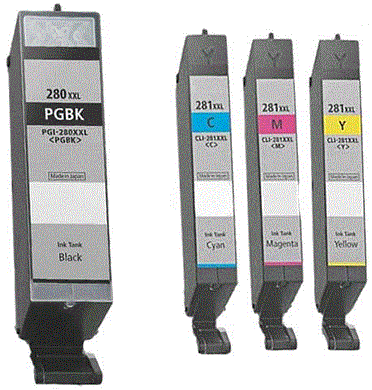
Crafter-focused 6-color AIO with 12-inch wide media handling for scrapbooks and craft paper. Uses Canon PGI-280 / CLI-281. Best for: scrapbookers and crafters printing on 12×12 cardstock.
Key specs: 6-ink color inkjet AIO • supports 12×12 craft paper • ~15 ppm black, 10 ppm color • 4800 × 1200 dpi • Wi-Fi, AirPrint, Mopria, Canon PRINT • 100-sheet front + 100-sheet rear • 4.3-inch touchscreen • Pixma Cloud Link.
What owners praise: One of the only consumer printers that handles 12×12 scrapbook paper natively. 6-ink system gives photo output a notable lift over 4-ink AIOs. Touchscreen craft templates are popular with the Cricut/scrapbooking crowd.
Recurring complaints: Niche use case — if you don't need 12×12, the Canon TR8620a is a better value. Six cartridges = more replenishment cycles.
Ideal buyer: Scrapbookers, Cricut owners, and crafters who specifically need 12×12 paper support.
Cost of ownership: Six PGI-280/CLI-281 cartridges. Castle Ink compatibles cut OEM cost significantly.
Approx. price: $279–$329 • Where to buy: Amazon | Best Buy | Walmart
4. Epson SureColor P900
17-inch wide-format pigment photo printer. Uses Epson UltraChrome PRO10 cartridges. Best for: serious photographers who need 17×22 panoramic prints.
Key specs: 10-color UltraChrome PRO10 pigment • up to 17×22″ (A2+) • 5760 × 1440 dpi • auto Photo/Matte Black switching • Wi-Fi, USB-C, Ethernet • AirPrint, Epson Print Layout • 4.3-inch color touchscreen • optional roll-paper unit.
What owners praise: The "best you can buy" for desktop archival photo printing. Color accuracy and shadow detail rival much larger pro printers. Auto black ink switching saves real money.
Recurring complaints: Big footprint (~24" wide). Expensive ink. First-time setup is involved. Some users wish the optional roll unit shipped standard at this price.
Ideal buyer: Pro and serious enthusiast photographers who need 17-inch wide capability and archival permanence.
Cost of ownership: Per-print cost similar to P700 on smaller sizes; 17×22 prints run $4–$6 each in pigment + paper costs at OEM pricing.
Approx. price: $1,199–$1,399 • Where to buy: Amazon | Best Buy | Walmart
5. Canon PIXMA TR8620a
5-color home AIO with strong photo output for the price. Uses Canon PGI-280 / CLI-281. Best for: households that print everyday photos plus documents.
Key specs: 5-ink color inkjet AIO • ~15 ppm black, 10 ppm color • auto duplex print + 20-sheet ADF • Wi-Fi, Wi-Fi Direct, Ethernet • AirPrint, Mopria, Canon PRINT • 100-sheet rear + 100-sheet cassette • 2.7-inch touchscreen.
What owners praise: The dedicated photo black + 4 dyes give noticeably better skin tones than 4-cartridge AIOs. Real ADF + auto duplex at this price is unusual. Compatible cartridges work without firmware drama.
Recurring complaints: Five cartridges = more replenishment. Color print speed is slow.
Ideal buyer: Households that want one printer that handles both documents and weekend photo prints well.
Cost of ownership: Castle Ink compatibles drop OEM CPP meaningfully on the 5-cartridge system.
Approx. price: $179–$229 • Where to buy: Amazon | Best Buy | Walmart
6. HP Envy Inspire 7955e
Style-forward home AIO with dedicated photo paper tray. Uses HP 67 / 67XL. Best for: casual photo printers who want a polished UI and clean look.
Key specs: Color inkjet AIO • 15 ppm black, 10 ppm color • auto duplex print + 35-sheet ADF • Wi-Fi, Wi-Fi Direct, Bluetooth LE • AirPrint, Mopria, HP Smart • 125-sheet plain tray + 25-sheet photo tray • 2.7-inch touchscreen.
What owners praise: Dedicated photo tray means no paper-swapping friction. Photo quality is a clear step up from DeskJet line. Modern aesthetic that doesn't look out of place in a living space.
Recurring complaints: HP+/Instant Ink lock-in is the most-cited issue — opt out at setup. HP 67 stock yields are low; XL is nearly mandatory.
Ideal buyer: Casual photo printers who want better-than-DeskJet quality without going to a dedicated photo printer.
Cost of ownership: Castle Ink HP 67XL compatibles bring CPP near $0.04 black / $0.07 color.
Approx. price: $179–$229 • Where to buy: Amazon | Best Buy | Walmart
Replacement ink: HP 67XL Compatible Bundle at Castle Ink
7. Canon SELPHY CP1500
Compact dye-sublimation 4×6 photo printer for instant prints. Uses Canon KP-108IN dye-sub cassettes. Best for: events, parties, and instant photo gifts.
Key specs: Dye-sublimation 4×6 (and 3.5×5, credit-card size) • ~41 seconds per 4×6 • Wi-Fi, USB, SD card slot, PictBridge • AirPrint, Canon SELPHY Photo Layout app • battery option (sold separately) for portable use.
What owners praise: Truly portable — battery-pack option lets you print at events. Dye-sub means no cartridge clogs; prints come out laminated and water-resistant. Consistent 4×6 output every time.
Recurring complaints: Locked into 4×6 (and smaller). Per-print cost is fixed by the consumable cassette — no way to bring it down with compatibles. App connectivity occasionally drops.
Ideal buyer: Anyone printing 4×6 photos at events, parties, or as gifts who values portability and instant output.
Cost of ownership: KP-108IN cassette = 108 prints + matching paper for ~$30–$35. Effective ~$0.30 per 4×6 print, paper included.
Approx. price: $149–$179 • Where to buy: Amazon | Best Buy | Walmart
8. Canon PIXMA G3270 MegaTank
Refillable-tank inkjet with Canon's color science. Uses Canon GI-21 ink bottles. Best for: high-volume photo printers who hate buying cartridges.
Key specs: Refillable-tank color inkjet AIO • ~11 ppm black, 6 ppm color • 4800 × 1200 dpi • Wi-Fi, USB, AirPrint, Mopria • 100-sheet rear tray • 1.35″ LCD • ~2 years of included ink.
What owners praise: Canon's color reproduction stands out vs. EcoTank in side-by-sides for skin tones and gradients. Effectively zero per-print ink cost. Tank refilling is cleaner than first-gen MegaTank designs.
Recurring complaints: No auto duplex. No ADF. Smaller paper input than competing EcoTanks. Wi-Fi setup occasionally requires the Canon PRINT app.
Ideal buyer: Households that print 50+ photos per week and want EcoTank-style economics with Canon color.
Cost of ownership: ~$0.003 black / $0.009 color CPP — functionally free per print after the printer is paid off.
Approx. price: $229–$279 • Where to buy: Amazon | Best Buy | Walmart
9. Epson EcoTank Photo ET-8550
Wide-format (13-inch) refillable-tank photo printer. Uses Epson 552 6-color ink bottles (including gray). Best for: photo enthusiasts who want EcoTank economics with up-to-13×19 capability.
Key specs: 6-color EcoTank (CMYK + Photo Black + Gray) • up to 13×19″ (A3+) • 5760 × 1440 dpi • auto duplex print • Wi-Fi, Wi-Fi Direct, Ethernet, USB • AirPrint, Mopria, Epson Smart Panel • 100-sheet input + 50-sheet photo tray + rear feed for fine art • 4.3-inch touchscreen.
What owners praise: Best-of-both-worlds: 6-color photo quality with EcoTank refill economics. The Gray ink improves black-and-white print quality dramatically vs. 4-color systems. Wide-format up to 13×19 in a tank-based printer is rare.
Recurring complaints: Higher upfront cost than other EcoTanks. First-time setup is involved. Dye-based, so less archival than pigment SureColors.
Ideal buyer: Hobbyist photographers and enthusiasts who want pro-ish output without pigment-printer prices.
Cost of ownership: Epson rates included ink for ~2,300 black / 6,200 color. Per-photo cost (paper not included) is a fraction of cartridge-based pricing.
Approx. price: $649–$799 • Where to buy: Amazon | Best Buy | Walmart
10. HP Envy Photo 7858
Compact home AIO oriented toward photo printing. Uses HP 64 / 64XL ink. Best for: households moving up from a basic DeskJet for better photo quality.
Key specs: Color inkjet AIO • 14 ppm black, 9 ppm color • 4800 × 1200 dpi • auto duplex print + 35-sheet ADF • Wi-Fi, Wi-Fi Direct, Bluetooth LE • AirPrint, Mopria, HP Smart • 125-sheet plain tray + 15-sheet photo tray • 2.7-inch touchscreen.
What owners praise: Photo paper tray + 5-color ink (separate photo black) gives noticeably better photo output than HP DeskJet equivalents. Solid touchscreen and HP Smart workflow.
Recurring complaints: HP 64-series cartridges are pricier per page than 67-series. HP+ enrollment lock-in concerns. Older model — firmware updates have been less frequent than newer Envy Inspire line.
Ideal buyer: Homes with existing HP 64-series cartridge stock or those who want a 5-color HP photo AIO at a lower price than the Envy Inspire.
Cost of ownership: HP 64 standard yields ~200 pages; 64XL ~600 pages. CPP at OEM is high; compatibles bring it down meaningfully.
Approx. price: $129–$179 • Where to buy: Amazon | Best Buy | Walmart
What to Look For in a Photo Printer
- Number of ink colors: 5 minimum for good photos, 6–10 for pro-grade output.
- Pigment vs. dye ink: Pigment lasts longer (decades) and resists fading; dye gives more vivid color but fades faster.
- Maximum print size: Decide if 4×6 and 8×10 cover your needs or if you want 13×19+ for large prints.
- Borderless printing: Standard on most photo models — verify the sizes supported.
- Replacement ink cost: Save 50–70% with compatible cartridges from Castle Ink.
Frequently Asked Questions
Are photo printers worth it vs. ordering prints online?
For occasional 4×6 prints, online services are cheaper. If you print regularly, want instant prints, or care about archival quality, a photo printer pays back fast.
How long do inkjet photo prints last?
With pigment inks and acid-free photo paper, prints can last 100+ years under glass. Dye-based prints typically last 25–75 years depending on display conditions.
Can I use compatible ink in a photo printer?
Yes — for everyday family photos, compatible cartridges work well and cost much less. For archival pro work, OEM pigment inks are still the safest bet.
External Resource
For ink longevity ratings used by professional photographers, see Wilhelm Imaging Research.
Bottom Line
For most enthusiasts, the Canon PIXMA PRO-200 is the consensus pick. Casual users will love the Canon PIXMA TR8620a or HP Envy Inspire 7955e. Whichever you pick, save 50–70% on every cartridge with compatible photo ink from Castle Ink.
How we chose these photo printers
This roundup is a research-based ranking, not a paid placement list. No manufacturer paid for inclusion, and no rankings were influenced by retailer commissions. Here’s exactly how we put it together so you can judge the picks for yourself.
1. Review aggregation (~40% weight)
We started with every printer in this category that has a meaningful sample size of verified-purchase reviews on Amazon (generally 500+ ratings, with exceptions for newer 2024–2025 models that are clearly trending). We pulled the average star rating, read through the most recent 1–2 star reviews to surface recurring failure modes (paper jams, print-head clogs, Wi-Fi drops, firmware lockouts on third-party ink), and weighted long-term reviews (6+ months of ownership) more heavily than first-impression reviews.
2. Professional review cross-check (~25% weight)
We cross-referenced rankings with hands-on reviews from PCMag, Wirecutter, RTINGS, Tom’s Guide, TechRadar, and Consumer Reports. When a printer scored well on Amazon but got panned by professional reviewers (or vice versa), we dug into why before deciding whether to include it.
3. Cost of ownership (~20% weight)
This is where Castle Ink has an edge most review sites don’t: we sell ink and toner for nearly every printer on the market, so we know real-world page yields and cartridge street prices cold. Every pick was scored on cost-per-page using current OEM and compatible cartridge pricing, not just the sticker price of the printer itself. A $79 printer that costs $0.22/page is a worse deal than a $189 printer that costs $0.04/page, and we ranked accordingly.
4. Specs and feature fit (~15% weight)
We checked manufacturer-published specs — print speed (ppm), duty cycle, paper handling, connectivity (Wi-Fi 6, AirPrint, Mopria, Ethernet), duplexing, ADF capacity where relevant, and mobile app quality — and matched them against what someone shopping in this specific category actually needs.
Who put this list together
Castle Ink has been selling printer ink and toner since 2005. Our team has handled cartridges for thousands of printer models and talks to customers every day about which printers are easy to live with and which ones aren’t. That ground-level feedback informs every roundup we publish.
What we did not do
We did not run controlled lab tests on each of these printers ourselves — anyone claiming to have personally bench-tested 40+ printers for a single article is almost always overstating it. Instead, we synthesized thousands of verified owner reviews, professional lab tests from outlets that do run controlled benchmarks, and our own cartridge-side data into the rankings you see above.
How often this list is updated
We refresh this roundup at least twice a year, or sooner when a major new model launches in this category, when a recommended model is discontinued, or when long-term review trends materially change a printer’s standing.
Found a printer that should be on this list?
Email us through our contact page and tell us which model and why — we read every suggestion and revisit the ranking quarterly.