
Last updated: November 27, 2026.
Quick answer: Brother TN450 is a high-yield black toner cartridge rated for about 2,600 pages, roughly double the standard TN420 (about 1,200 pages). It fits the Brother HL-2270DW, HL-2240, MFC-7860DW, MFC-7360N, DCP-7065DN and the other models listed below. Castle Ink sells a compatible Brother TN450 toner cartridge and a 5,200-page TN450 Jumbo.

Castle Ink
Fix the error, then stop overpaying: Brother toner from $10.95
Compatible Brother toner cartridges for up to 70% less than Brother charges. Same-day shipping when you order by 4 PM ET, lifetime replacement guarantee.
Compare genuine vs compatible Brother toner prices →
Shop all Brother toner →✓ Ships same day by 4 PM ET✓ Free US shipping over $50✓ Lifetime guarantee
Which Brother Printers Use TN450 Toner?
| Series | Models |
|---|---|
| HL (printers) | HL-2220, HL-2230, HL-2240, HL-2240D, HL-2270DW, HL-2280DW |
| DCP (copiers) | DCP-7060D, DCP-7065DN |
| MFC (all-in-ones) | MFC-7240, MFC-7360N, MFC-7460DN, MFC-7860DW |
| IntelliFax | IntelliFax-2840, IntelliFax-2940 |
What Is the Difference Between TN420 and TN450?
| Cartridge | Yield class | Approx. pages (5% coverage) |
|---|---|---|
| TN420 | Standard | ~1,200 pages |
| TN450 | High yield | ~2,600 pages |
| TN450 Jumbo (compatible) | Extra high yield | ~5,200 pages |
All three are the same size and fit the same printers. TN450 costs less per page than TN420, and the Jumbo version roughly doubles the TN450 again.
Do I Need a Drum Unit With TN450?
Yes, but not every time. The TN450 toner sits in a separate DR420 drum unit, which lasts about 12,000 pages, or four to five high-yield toners. Replace the drum only when the printer shows "Replace Drum" or prints show repeating marks, and move the drum over from the old toner to the new one each time.
How Do I Install a TN450 Toner Cartridge?
- Open the front cover and pull out the drum and toner assembly.
- Press the green lock lever on the DR420 drum and lift out the old toner.
- Gently rock the new TN450 side to side a few times to spread the toner, then remove its protective cover.
- Push it into the drum until it clicks into place.
- Clean the corona wire by sliding the green tab on the drum left and right a few times, then return it to its home position.
- Reinsert the assembly and close the cover.
If the printer still asks for toner after you install a new cartridge, reseat it firmly in the drum and check that all packaging is removed. Our guide on how to reset a Brother toner cartridge covers the menu reset and the "continue" setting.
Frequently Asked Questions
Is TN450 the same as TN420?
They fit the same printers and drum, but TN450 holds more toner: about 2,600 pages versus about 1,200 for TN420.
Does TN450 work in the HL-L2300D or HL-L2340DW?
No. The HL-L2300 series uses TN630 / TN660 toner and the DR630 drum. See our TN660 guide.
How many pages does a TN450 really print?
About 2,600 pages at 5% coverage, which is typical text. Heavy graphics or large solid areas reduce the count.
Can I use a compatible cartridge without voiding my warranty?
In the US, the Magnuson-Moss Warranty Act means a manufacturer can’t void your printer warranty simply because you used a third-party cartridge. They can only deny coverage for damage the cartridge actually caused.
Shop Brother TN450 Toner
Orders placed by 4 PM ET Monday–Friday ship the same day, and shipping is free on orders over $50.
Related: How to reset a Brother toner cartridge · How long do toner cartridges last? · Find ink by printer
Castle Ink
Save up to 70% on Brother toner
Compatible cartridges with a lifetime replacement guarantee. Order by 4 PM ET and it ships the same day. Free US shipping over $50.
Best-selling Brother toner
Shop all Brother toner →-
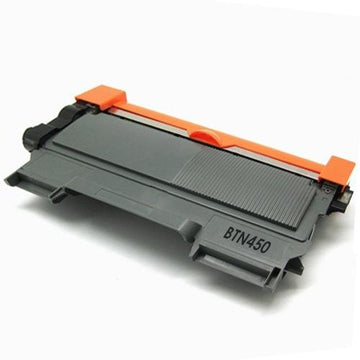 Brother TN450 Black Toner Cartridge – High-Yield Compatible
$30.95
$71.49View cartridge → -
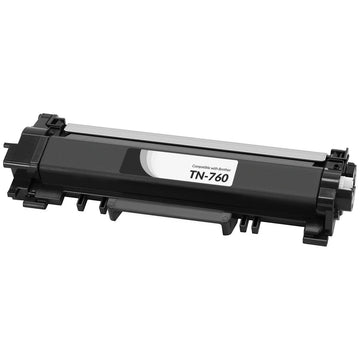 Brother TN760 Black Toner Cartridge – High-Yield Compatible
$31.95
$59.95View cartridge → -
 Brother TN660 Black Toner Cartridge – High-Yield Compatible
$29.95
$69.95View cartridge → -
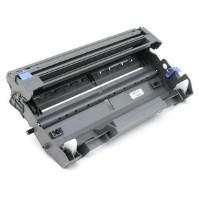 Brother DR420 Drum Unit – Compatible
$41.95
$69.95View cartridge →
More Brother printer help
All printer help →- What Is Brother TN436 Toner & Which Printers Use It?
- What Is the Brother DR630 Drum Unit & Which Printers Use It?
- What Is the Brother DR730 Drum Unit & Which Printers Use It?
- What Is Brother TN850 Toner & Which Printers Use It?
- What Is Brother TN920 Toner & Which Printers Use It?
- What Is Brother TN227 Toner & Which Printers Use It?