




Product Specifications
| SKU | PGI-225CLI-226 |
|---|---|
| OEM Part Number | PGI-225, CLI-226 |
| Cartridge Type | Ink Cartridges |
| Compatible Brand | Canon |
| Condition | Remanufactured |
| Warranty | 100% Satisfaction Guarantee |
Product Description
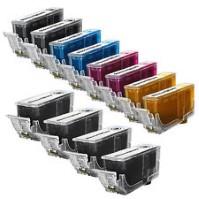
Canon PGI-225 / CLI-226 12-pack at a glance: twelve remanufactured Canon cartridges (4 × PGI-225 pigment black, 2 each CLI-226 black, cyan, magenta and yellow) for 13 Canon PIXMA models including the iP4820, iP4920, MG5320, MG6220, MX882 and MX892. Pigment black prints about 340 pages and each CLI-226 color about 510 pages. Backed by a 1-year 100% satisfaction guarantee; orders by 4 PM ET (Mon–Fri) ship the same day from Long Island, NY.
Key Facts
| Condition | Remanufactured (original Canon cartridges, cleaned, refilled and tested) |
| Replaces OEM parts | PGI-225PGBK 4530B001, CLI-226BK 4546B001, CLI-226C 4547B001, CLI-226M 4548B001, CLI-226Y 4549B001 |
| Page yield | PGI-225 pigment black about 340 pages each; CLI-226 cyan, magenta, yellow about 510 pages each (about 4,420 rated pages across the pack). CLI-226 black is the photo/dye black and has no separate text-page rating. |
| Cost per page | about 2.3¢ per page at our $99.95 price (about $8.33 per cartridge) |
| Cartridges included | 12 (4 pigment black, 2 black, 2 cyan, 2 magenta, 2 yellow) |
| Chip | Original Canon chip on every cartridge |
| Guarantee | 1-year 100% satisfaction guarantee: replacement or refund |
| Shipping | Same business day when ordered by 4 PM ET (Mon–Fri); USPS 2–5 business days, free over $50 |
What's in the Box
- 4 × Canon PGI-225PGBK Pigment Black (4530B001) — about 340 pages each
- 2 × Canon CLI-226BK Black (4546B001)
- 2 × Canon CLI-226C Cyan (4547B001) — about 510 pages each
- 2 × Canon CLI-226M Magenta (4548B001) — about 510 pages each
- 2 × Canon CLI-226Y Yellow (4549B001) — about 510 pages each
Page yields are the manufacturer's ratings for the matching original cartridges under ISO/IEC 24711, at roughly 5% page coverage. Your results will vary with what you print.
Compatible Printers (13 models)
- Canon PIXMA iP4820
- Canon PIXMA iP4920
- Canon PIXMA iX6520
- Canon PIXMA MG5120
- Canon PIXMA MG5220
- Canon PIXMA MG5320
- Canon PIXMA MG6120
- Canon PIXMA MG6220
- Canon PIXMA MG8120
- Canon PIXMA MG8220
- Canon PIXMA MX712
- Canon PIXMA MX882
- Canon PIXMA MX892
Not sure? Look up your exact model on our Find Ink by Printer page, or contact us and we'll confirm the right ink for you.
Printer guides: What ink does the Canon PIXMA MG6120 use? · What ink does the Canon PIXMA MX882 use?
Will Not Fit
- Gray needed separately: the MG6120, MG6220, MG8120 and MG8220 also use a Canon CLI-226GY Gray (4550B001), which is not in this set.
- Both blacks are required: PGI-225 (pigment, for text) and CLI-226BK (dye, for photos) go in different slots and are not interchangeable.
- Different generations: PGI-220 / CLI-221 (older) and PGI-250 / CLI-251 (newer) look similar but do not fit these printers.
Part Numbers & Also Known As
PGI-225, PGI225, PGI-225PGBK, PGI-225BK, 4530B001, 4530B001AA, CLI-226, CLI226, CLI-226BK, CLI-226C, CLI-226M, CLI-226Y, 4546B001, 4546B001AA, 4547B001, 4547B001AA, 4548B001, 4548B001AA, 4549B001, 4549B001AA, Canon 225 226 ink, PGI-225 CLI-226 combo. Gray companion: CLI-226GY 4550B001.
Chips, Printer Messages & Installation
Installing: open the scanner unit or front cover until the print head holder moves to the replacement position. Press the tab on the empty tank and lift it out. Remove the new tank from its bag, pull off the orange protective cap without touching the ink outlet, set it into the slot that matches its color label and press down until it clicks and its lamp lights red.
Printer messages: some printers show a notice that a non-genuine or refilled cartridge is installed, or that the ink level can't be detected. Confirm the message to keep printing. If a tank isn't recognized, reseat it and check the cap is off.
Still stuck? See our guide to fixing a cartridge that isn't recognized or contact us and we'll make it right.
Quality
Remanufactured: original Canon PGI-225 and CLI-226 cartridges cleaned, refilled and tested. Castle Ink sells remanufactured inkjet cartridges and compatible (newly manufactured) toner.
Other Options for the Same Printers
- Canon PGI-225 Black + CLI-226 4-Color 5-Pack
- Canon PGI-225 Black + CLI-226 5-Color 6-Pack (with gray)
- Canon PGI-225 Pigment Black, single
- Canon CLI-226 Gray, single
Frequently Asked Questions
Which printers use Canon PGI-225 and CLI-226?
Canon PIXMA iP4820, iP4920, iX6520, MG5120, MG5220, MG5320, MG6120, MG6220, MG8120, MG8220, MX712, MX882 and MX892.
What is the difference between PGI-225 and CLI-226 black?
PGI-225 is pigment black for sharp text; CLI-226BK is dye black used for photos. Your printer needs both.
How many pages do these cartridges print?
About 340 pages per PGI-225 pigment black and about 510 pages per CLI-226 color cartridge (ISO/IEC 24711, ~5% coverage).
Does my MG6220 need anything else?
Yes. The MG6120, MG6220, MG8120 and MG8220 also need a CLI-226 Gray tank, sold separately.
Will this void my printer warranty?
No. Under the U.S. Magnuson-Moss Warranty Act, a manufacturer can't void your printer warranty just because you used a remanufactured cartridge.
When will my order ship?
Orders placed by 4 PM ET, Monday through Friday, ship the same business day from Long Island, NY, by USPS (2–5 business days). Expedited 1–2 day delivery is $25, and shipping is free on orders over $50.
Shipping & guarantee: same-day shipping on orders by 4 PM ET (Mon–Fri), free USPS shipping over $50 ($6.95 under $50), and a 1-year 100% satisfaction guarantee. Castle Ink has served 100,000+ customers since 2005 and is BBB-accredited.
- See all All Ink & Toner
- See all Canon PGI-225 & CLI-226 Ink Cartridges – Black, Cyan, Magenta, Yellow, Gray & Sets
- See all Canon Printer Ink
Guides for this cartridge
- Skip, pause or cancel anytime from your account or any order email
- 10% off every delivery, locked in for as long as you subscribe
- Same remanufactured quality, 1-year guarantee on every cartridge